Basic QR
QR menu
$0/mo
- QR menu in 3 languages
- A cart guests show to the waiter
- Table games
- QR cards to print
Moymenyu gives restaurants and cafés anywhere in the world a free QR menu that guests open with their phone camera, in English, Russian or Azerbaijani. Prices show in your own currency. Basic QR is always free, with no time limit.
Sign-up is free, no card needed.
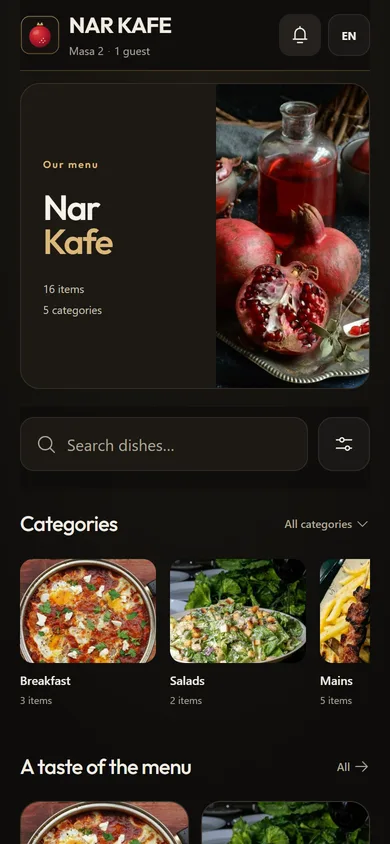
A QR menu is a digital menu that opens in the guest's phone browser when they point the camera at a QR code on the table. The guest sees categories, dishes, photos, prices, and diet and allergen tags without installing an app. The owner edits the menu online, and the printed QR code on the table stays the same. For more detail, read our guide what is a QR menu.
The free package for restaurants and cafés is called Basic QR, and it works in any country. Basic QR is always free, with no time limit. Sign-up is free, no card needed. This is what it includes:
Table codes and the venue code do different jobs. Table codes sit on the tables, one per table. The venue code is for places where people look at the menu before they sit down: the entrance, the window or your Instagram profile.
Every menu shows a small 'Menu by moymenyu' line, and the printed cards carry the moymenyu.com wordmark. This is the same on every package.
Paid packages are about orders and the team, not about the menu itself. They are available to venues in any country and invoiced in Azerbaijani manat (1 USD = 1.70 ₼); the free menu works everywhere too. Growth costs $7 per month and adds:
Full Kitchen costs $12 per month and adds online card payment. Online card payment is not live yet, so for now the practical choice is between Basic QR and Growth.
You do not need a designer or a developer to set up a free QR menu. Prepare your current menu (on paper or as a list) and, if you have them, your logo and a cover photo. The full walkthrough is in our guide how to make a QR code menu; here is the short version:
Create a free QR menuSign-up is free, no card needed.
Guests do not all read the same language. Visitors from abroad often look for English; in Azerbaijan, for example, local guests may prefer Azerbaijani or Russian. A digital menu in three languages means the waiter does not have to translate every dish at the table.
In Moymenyu, one menu holds all three languages. You fill in the dish names for each language yourself. One name and a price are enough to start; the other languages are optional. If a translation is left empty, guests see the first (main) name in its place.
You do not have to fill in every translation at once. You can start with one name per dish and add the other languages later. For example, if 'Lentil soup' has a price but no Russian name yet, a guest whose phone is set to Russian still sees the dish, under its main name.
When a guest scans the QR code, the menu opens in the language of their phone if it is English, Russian or Azerbaijani, and in English for any other phone language. A language switch on the menu lets them change it at any time.
Nothing is translated automatically, except by the AI photo scan. When you photograph a paper menu, the AI reads the printed dishes and prices, then adds the other two languages and a short description. You check the result and correct it before saving.
The AI photo scan works on every package. The first scan for each restaurant is free; later scans cost 1 credit each, and credits are paid.
Prices change, new dishes appear, and some evenings the kitchen runs out of something. With a paper menu, each change means a new print run. With a QR menu, you make the change in your Moymenyu account, and the QR code on the table stays the same.
New prices, new dishes and sold-out marks show the next time a guest opens or refreshes the menu. There are no new cards to print and no old menus to collect from the tables.
The sold-out switch is for the moment a dish runs out. The dish stays visible with a sold-out mark, so guests can see it is not available before they call the waiter. When the dish is back, switch the sold-out mark off.
Everyday edits that no longer need a reprint:
A PDF menu is a file that a QR code opens; a paper menu is printed and handed to guests. Here is how the three compare in daily work:
| QR menu (Moymenyu) | PDF menu | Paper menu | |
|---|---|---|---|
| Changing a price | Edit in your account; guests see it the next time they open the menu | Edit the file and upload it again | Reprint the menu |
| A dish runs out | Sold-out switch; the dish stays on the menu | Edit the file or tell guests | The waiter tells guests |
| Three languages | One menu with a language switch | A separate file per language | Separate printed copies |
| On a phone screen | Opens as a web page in the browser | Guests zoom in and scroll a document | Not on the phone |
| Diet tags, allergens, search | Tags on each dish, search and filters | Only what is written in the file; no filters | Only what is printed |
| What the guest needs | A phone camera, no app | A phone, and the file must download | Nothing |
Paper still has its place, for example for a guest without a phone. You can keep a few printed copies and put a QR code on every table. If your menu is a PDF today, you can paste its text as a list or photograph the printed version. For a longer comparison, read QR menu vs PDF menu.
Moymenyu is made for places that serve food and drinks, in any city and any country:
The setup is the same everywhere: at sign-up you enter your city and a phone number with its country code, and in Settings you choose the currency your menu shows. Guests open the menu on iPhone and Android.
Basic QR costs $0 per month, with no time limit, in any country. The paid packages, Growth at $7 and Full Kitchen at $12 per restaurant per month, are available to venues in any country too and invoiced in Azerbaijani manat at 1 USD = 1.70 ₼, so Growth comes to about 11.90 ₼ a month. On Basic QR your menu shows prices in the currency you choose; on the paid packages they are in manat.
QR menu
$0/mo
Desk included
$7/mo
Everything in Growth
$12/mo
Basic QR is free in every country. The paid packages are available to venues in any country too; they are invoiced in manat (1 USD = 1.70 ₼).
The free package gives guests the menu and a cart: they show the cart to the waiter, who takes the order as usual. If you want guests to send orders from their phones straight to the kitchen, that is the Growth package, at $7 per month (about 11.90 ₼), available to venues in any country.
With Growth, guests order from the table, orders appear on the kitchen screen and can print as tickets on 58 mm or 80 mm thermal printers. Growth also includes Moymenyu Desk POS for Windows, unlimited staff accounts for waiters and cooks, sales reports and the bill-split view.
If the waiter taking the order works for you, Basic QR is enough, wherever you are. Any venue can start with the free QR menu and move to Growth when it wants orders to go straight to the kitchen. For questions about the packages, call +994 51 555 55 34 or see the Moymenyu homepage.
Want to see it before you sign up? Open Nar Kafe, our demo venue: scan its QR code with your phone camera or open the menu on this page. Switch the language, look through the categories and see the menu the way your guests will.

Nar Kafe: live demo
Scan the code with your phone camera or press the button: this is the demo venue’s real menu.
Open the demo menuCreate a free QR menuSign-up is free, no card needed.
A QR menu is a digital menu that opens in the phone browser when a guest scans the QR code on the table. The owner edits dishes and prices in the Moymenyu account, and the printed code stays the same.
Yes, for restaurants and cafés in any country. Basic QR is always free, with no time limit. Sign-up is free, no card needed.
It includes the digital menu (categories, dish photos, sizes, diet and allergen tags, a sold-out switch), a cart guests show to the waiter, table games, prices in your currency, 16 designs, a separate QR code for every table plus one venue QR code, print templates, and a menu in English, Russian and Azerbaijani. It also comes with one staff account for the owner.
Orders sent from the table straight to the kitchen, the kitchen screen, thermal printer tickets, Moymenyu Desk POS, unlimited staff accounts, sales reports and the bill-split view are in Growth at $7 per month. Full Kitchen at $12 per month adds online card payment, which is not live yet. The paid packages are available to venues in any country and invoiced in manat. Each AI scan after the first one costs 1 credit.
Guests can put dishes in a cart and show it to the waiter, who takes the order as usual; nothing is sent to the kitchen. Orders that go straight to the kitchen come with Growth at $7 per month.
No. The guest points the phone camera at the QR code, and the menu opens in the browser on iPhone and Android.
No. You change the price in your account, and guests see it the next time they open or refresh the menu. The printed QR code stays the same.
Three: English, Russian and Azerbaijani. You fill in the names for each language; one name and a price are enough to start, and an empty translation shows the main name. The menu opens in the guest's phone language when it is one of the three, otherwise in English, and there is a language switch.
Yes. In Settings you choose the currency your menu shows: Azerbaijani manat ₼ (the default), US dollar $, euro €, pound sterling £, Turkish lira ₺, Russian rouble ₽, Georgian lari ₾, Kazakh tenge ₸, Ukrainian hryvnia ₴, Polish złoty zł, UAE dirham (AED), Saudi riyal (SAR), Qatari riyal (QAR), Swiss franc (CHF), Canadian dollar (CA$), Australian dollar (A$), Indian rupee ₹, Uzbek som (so'm), Pakistani rupee (Rs), Malaysian ringgit (RM) or Indonesian rupiah (Rp). Guests see every price in that currency. On the paid packages, prices are in manat.
Yes. Moymenyu gives you a separate QR code for every table, plus one QR code for the whole venue for the door, the window or Instagram.
Take a photo of your paper menu: the AI reads the dishes and prices, adds the other two languages and a short description, and you check everything before saving. The first scan for each restaurant is free, and later scans cost 1 credit each.
No. The free QR menu shows your menu; it is not a fiscal cash register, and its bill is not a fiscal receipt.
Basic QR is always free, with no time limit. Questions? Give us a call.